




An executive update presentation is a short deck that reports where a project stands to senior decision-makers and asks them for specific action. Unlike a general status report, it does not carry the full record of work — only enough evidence to approve, redirect, or resource the next step.
Put the conclusion on the first content slide: where the work stands against the plan, and what you need from the room.
Why executives lose the thread
The usual failure is chronological order. The deck retraces the quarter slide by slide and reaches the point on slide fourteen. By then the room has formed its own reading of the numbers and is asking questions the later slides were meant to answer.
The second failure is topic titles. A slide titled "Hiring" says which folder the content belongs to. A slide titled "Hiring is two roles behind plan and slipping the launch" makes a claim the audience can accept, challenge, or act on. Microsoft's PowerPoint accessibility guidance recommends unique, descriptive slide titles so people can navigate a deck; the same habit does the argumentative work here.
The third is an ask buried in discussion. A deck that ends with "questions?" instead of a named decision, owner, and date produces agreement without commitment.
The five-part structure
This order matches how a decision-maker reads: conclusion, what it requires, why to believe it, what could break it, what you want.
- Bottom line. The overall position in one or two sentences — on plan, off plan, or changed — plus the single most consequential fact.
- Decisions. What the room must decide today, one per line, with options, the tradeoff, and an owner.
- Evidence. The numbers or examples behind the bottom line, compared against the plan or the prior period rather than against zero.
- Risks. What could change the conclusion, how likely it is, and what would trigger a response.
- Asks. Budget, people, a decision by a date, an unblocked dependency — and from whom.
Full metrics, methodology, and workstream detail sit in an appendix after the asks, organized so you can jump to a specific question without lengthening the main deck.
Write the executive summary slide first
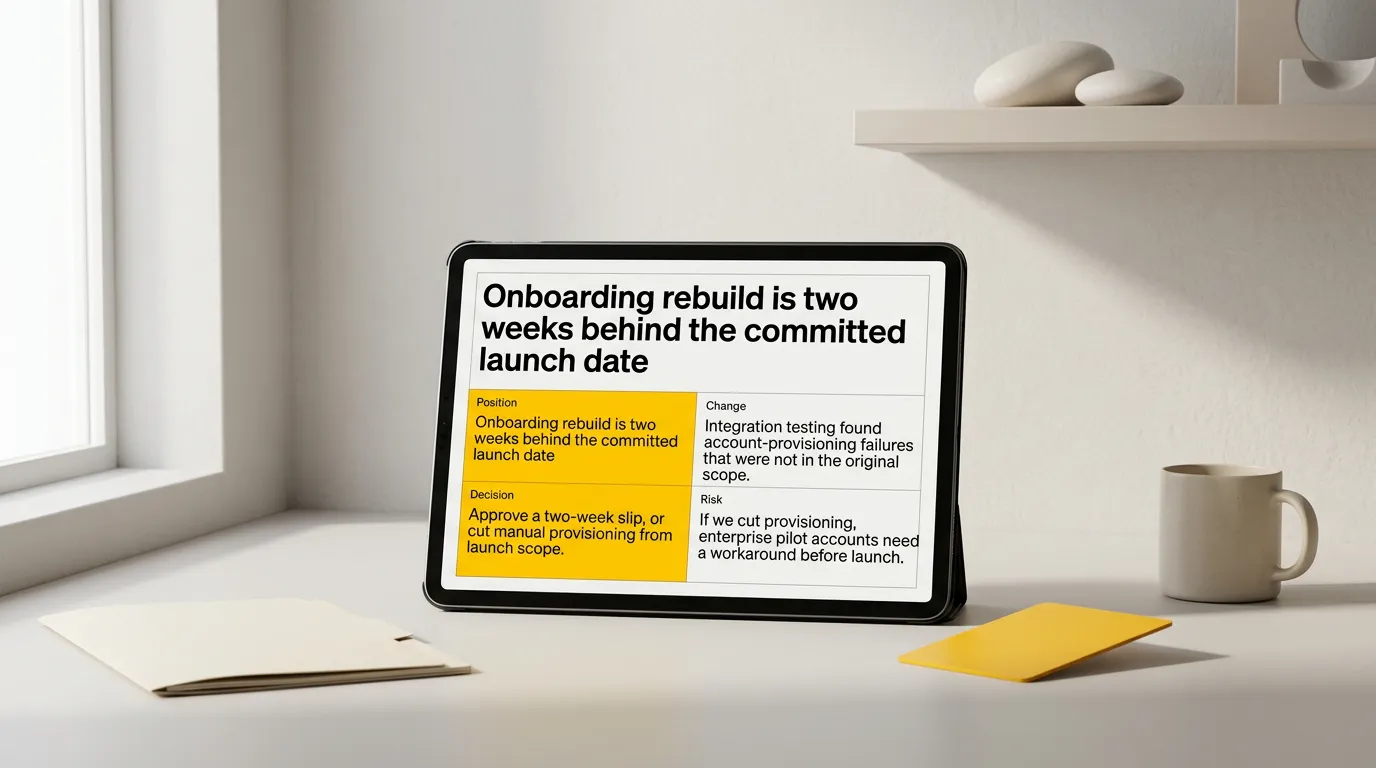
If you cannot write the summary slide, the update is still a collection of activity rather than a position. Four lines carry it — position, change, decision, risk:
Position. Onboarding rebuild is two weeks behind the committed launch date. Change. Integration testing found account-provisioning failures that were not in the original scope. Decision. Approve a two-week slip, or cut manual provisioning from launch scope. Risk. If we cut provisioning, enterprise pilot accounts need a workaround before launch.
No chart, no build. The rest of the deck now has a job: prove those lines and give the room what it needs to choose between the two options.
Choose evidence that can change someone's mind
Evidence earns a slide when it supports the bottom line or bounds a risk. Before a chart survives, check that its shape or comparison actually proves the title — if a single value carries the meaning, show the number instead. Check that the comparison is the one an executive would reach for: against plan, against last period, against the alternative. Then remove the chart in your head. If the decision does not change, it belongs in the appendix.
When the evidence comes from a study rather than an operational metric, lead with the finding rather than the method. Senior audiences ask about method when the conclusion matters to them.
Report risks so they stay decisions
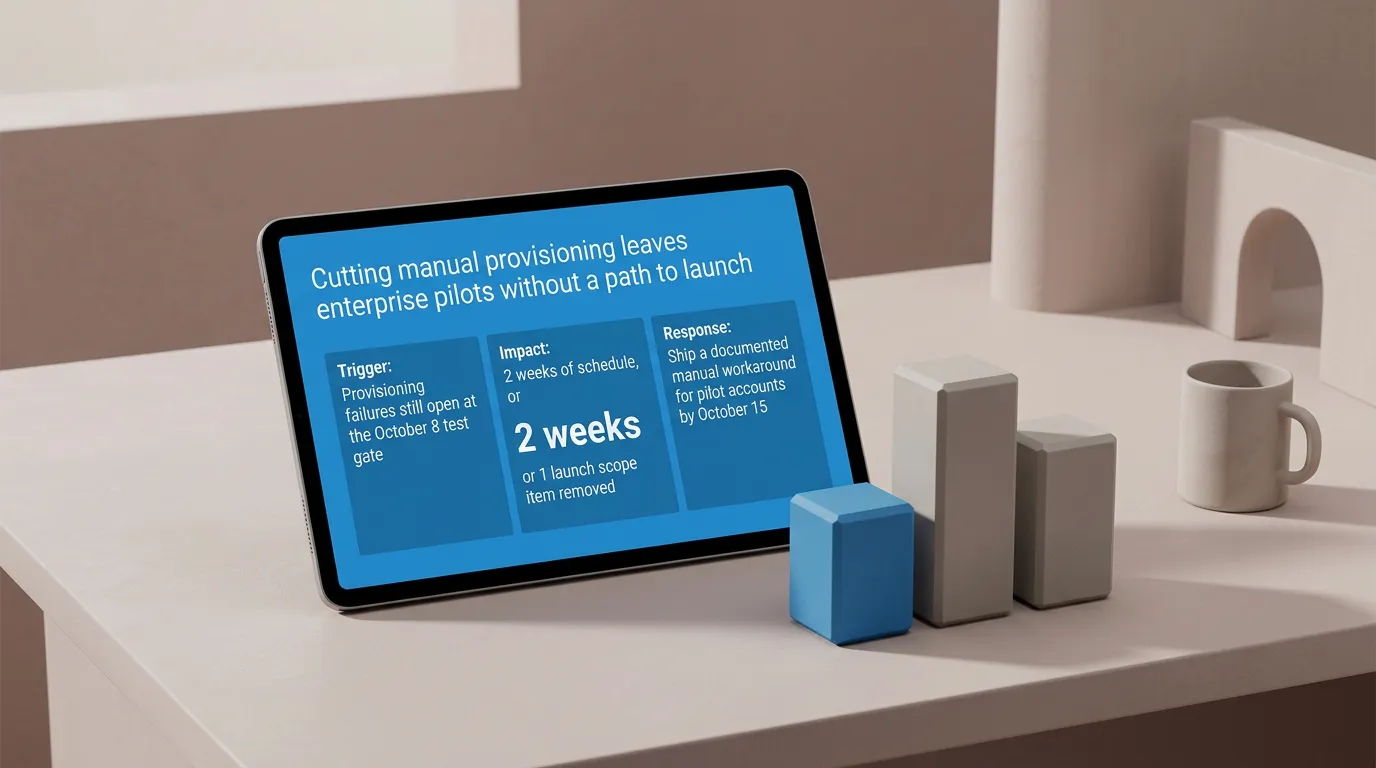
The UK government's guidelines for managing projects state that regular highlight reports should cover progress against the plan, resource and budget status, problems, the impact of issues and changes, upcoming deliverables, and revised cost or schedule forecasts. For an executive update the operative word is impact. An issue reported without its effect on cost, date, or scope is not yet decision material.
So give each risk a trigger you are watching, the effect if it fires, and the response you would take. That turns a warning into something the room can fund now instead of discovering later.

Make the ask explicit
An ask has four parts: what you want, who can grant it, by when, and what happens if the answer is no. "We need more engineering support" has none of them. "Move two engineers from Platform to Onboarding through October 15, decided by Friday, or we launch without manual provisioning" has all four.
An ask large enough to need its own case — new budget, a change of direction, a contract — has outgrown the update. Build it as a separate deck with the business proposal structure.
Executive update vs. status update
Both report the same work to different rooms, so they cut differently.
| Executive update | Status update | |
|---|---|---|
| Audience | Decision-makers who control resources | Delivery team, peers, stakeholders |
| Opens with | Bottom line and requested decision | Current position and recent work |
| Detail level | Only what supports the decision | Workstream-level progress |
| Risks | Impact and response, escalated | Full register with owners |
| Ends with | Named ask, owner, date | Next work and dependencies |
| Typical length | Summary plus four to six slides | As long as the work requires |
For the delivery side, the project status update presentation format carries more detail without spending an executive's time on it.
Build the deck from the written update you already have
Most executive updates start as a document — a memo, a written status report, meeting notes. The thinking is already there; the slow part is turning it into slides.
Work in this order:
- Mark the bottom line in the source. Find the sentence that states the position. If it is not written yet, write it.
- Tag every paragraph as decision, evidence, risk, or ask. Untagged material goes to the appendix.
- Reorder the source to match the five-part structure before you generate anything. Order fixed in text is order fixed in the deck.
- Rewrite each section heading as a claim. The heading becomes the slide title, so it should assert something.
- Generate the slides, then read only the titles. They should form the argument end to end.
- Edit content and structure first, layout second. Layout choices made on a wrong sequence get thrown away.
If your raw material is a meeting record, turn the notes into a decision record first, so decisions and open questions are separated before anything becomes a slide. For a long written report, the same principle applies at greater scale: extract findings and implications before building slides.
Turn your written update into an executive deck
The mechanical part — splitting the text, choosing compositions, aligning elements, keeping typography consistent — is the part worth removing. Plainline takes the written update, splits it into slides, identifies which parts are claims, numbers, quotes, or conclusions, and applies consistent layouts. After generation you edit the content, slide order, semantic blocks, layout variants, and media, then preview, share, or export.
The judgment stays with you: what the bottom line is, which risks matter, what you are asking for. Paste the update once the five parts are in the right order.
Frequently asked questions
How long should an executive update presentation be?
Long enough to support one decision — in practice a summary slide plus four to six content slides. Length follows the decision, not the reporting period. If a monthly update needs the same fifteen slides every time, most of them are recording activity rather than supporting a choice.
Should I send the deck before the meeting?
Send it if the room needs time to consider a decision, and make the summary slide readable standalone — no build, no verbal setup. A deck that only works when narrated will be misread when it circulates afterward, which it will.
What if there is no decision to request this cycle?
Say so on the summary slide and keep the update short: position, change, risk, and the date of the next decision point.
Where do detailed metrics belong?
In the appendix. Keep only the numbers that support the bottom line or bound a named risk in the main sequence. Material caveats stay in the main deck even when the supporting detail moves back.
Sources
- Guidelines for Managing Programmes and Projects — UK Government (Department for Business, Innovation and Skills)
- Make your PowerPoint presentations accessible to people with disabilities — Microsoft Support